
Thursday, September 24, 2026 · v1.29.0
Health Checks Now Link Critical Risks to Incidents and Relevant Alerts
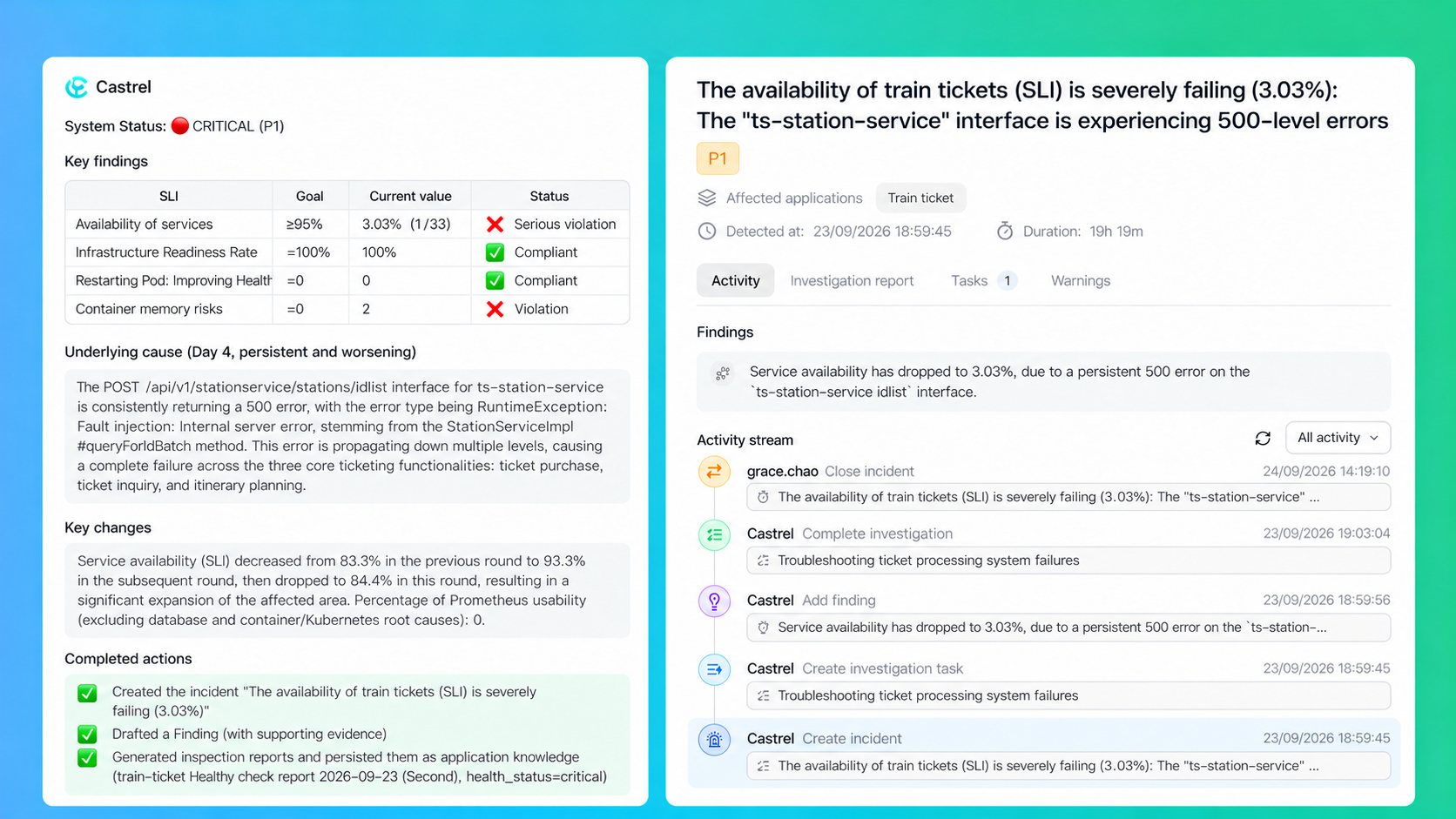
Health checks that come back critical now link to an existing incident or open a new one, attaching alerts only when they match the risk. This release also adds model selection and goal conditions to automations, and bulk download on the knowledge page.
New Feature: Health Checks Automatically Link Incidents
When an application's health check returns a Critical result, Castrel reviews evidence from the current check and past health check records to see whether there is an open incident with matching symptoms.
If it finds a match, Castrel links the health check to that incident and adds any new anomaly supported by evidence to its findings. This prevents duplicate incidents for the same risk.
If no incident matches, Castrel creates one, sets its severity based on business impact, and automatically links related alerts.
The health check report records the incident that was linked or created, along with its latest status and investigation progress.
Full Release Checklist
feat
- Added automatic incident linking for critical health check results: Castrel reuses a matching open incident or creates a new one, and links alerts when they match the risk.
- Added an "Alert Intelligent Grading" automation template that assigns P0/P1/P2 levels to alerts on a schedule and re-grades them when alerts change, without touching their original severity; the alert list and details show the level, reasoning, and change history.
- Added bulk download on the knowledge page.
- Added model, thinking mode, and reasoning effort selection to automations (defaults to Auto); sessions triggered by an automation show the selected model.
- Added an optional goal condition to automations, so tasks keep running until the goal is met; it can also be set when creating or editing an automation in chat.
- Improved manual runs so they no longer require the automation to be enabled; the enabled state now only controls scheduled and event triggers.
- Added automatic task linking for events, and sessions now show their associated automation.
- Removed the / command menu from the automation instructions editor.
- Restructured the underlying implementation of sign-in, sign-up, workspace management, settings, and sessions for better stability.
bugfix
- Fixed an issue where IM plugin connections such as Lark, DingTalk, WeCom, Telegram, WPS, and Email could not be selected when binding knowledge to a plugin.
- Fixed the permission badge in automation instructions defaulting to "Ask for approval", which did not match actual behavior; it now always shows "Full access".